


Difference between revisions of "How To Change a User's Password"
From All n One's bxp software Wixi
Philip Lacey (talk | contribs) |
Philip Lacey (talk | contribs) |
||
| Line 1: | Line 1: | ||
== Introduction == | == Introduction == | ||
| − | In the current times, with data security a constant concern, it has never been so important to have a strong, solid password. There is then a trade-off between strong complicated passwords being too difficult to | + | In the current times, with data security a constant concern, it has never been so important to have a strong, solid password. There is then a trade-off between strong complicated passwords being too difficult to remember, and simple easy to remember passwords being too easy to break. |
To facilitate changing password requirements, we have tried to make it as easy as possible to make password changes. | To facilitate changing password requirements, we have tried to make it as easy as possible to make password changes. | ||
| Line 31: | Line 31: | ||
# The next page will look like this | # The next page will look like this | ||
[[File:Change_Password_2.JPG]] | [[File:Change_Password_2.JPG]] | ||
| − | # First enter your password | + | # First enter your current password , then enter your new password (there is a password strength indicator which will change as you type, providing the password is strong enough) |
# Repeat the new password, then click 'Change My Password' | # Repeat the new password, then click 'Change My Password' | ||
Revision as of 15:14, 5 March 2015
Contents
1 Introduction
In the current times, with data security a constant concern, it has never been so important to have a strong, solid password. There is then a trade-off between strong complicated passwords being too difficult to remember, and simple easy to remember passwords being too easy to break.
To facilitate changing password requirements, we have tried to make it as easy as possible to make password changes.
2 How To Change a User's Password in bxp software
There are two main ways to change a password in bxp software
1) Through the Quick Link at the bottom of every bxp software Screen (see image)
PLEASE NOTE : This method is used by a user, if they already know their password and are looking to upgrade it

2) Through the System Access Management (SAM) module 
PLEASE NOTE : This method is used by the System Champion, if a user has forgotten their password.
3 Change Password Through Quick Link
- Click on the button in the image above, at the bottom of your bxp software page
- The next page will look like this
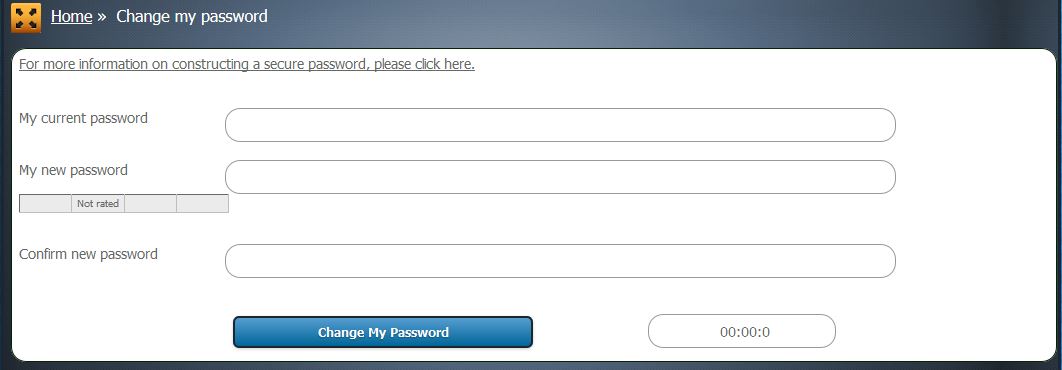

- First enter your current password , then enter your new password (there is a password strength indicator which will change as you type, providing the password is strong enough)
- Repeat the new password, then click 'Change My Password'
4 Change Password Through SAM
- Go to SAM | User Administration | Edit USer - Security Details
- Lookup and select the user in question
- In the 'Password' box, overwrite the password with something generic
- Scroll to the bottom of the page and click 'Update the User'
PLEASE NOTE : the reason we recommend to use a generic password here, is that when the user next logs in, they will be forced to change the password again to something they want


